See what matters.
The visual tools are easy to read, so you can get the information you need without filling your whole screen.
 Thin Client
Member sign in
Thin Client
Member sign in
Thin Client keeps the useful stuff easy to find, your screen easy to read, and your account in one place. That is it.
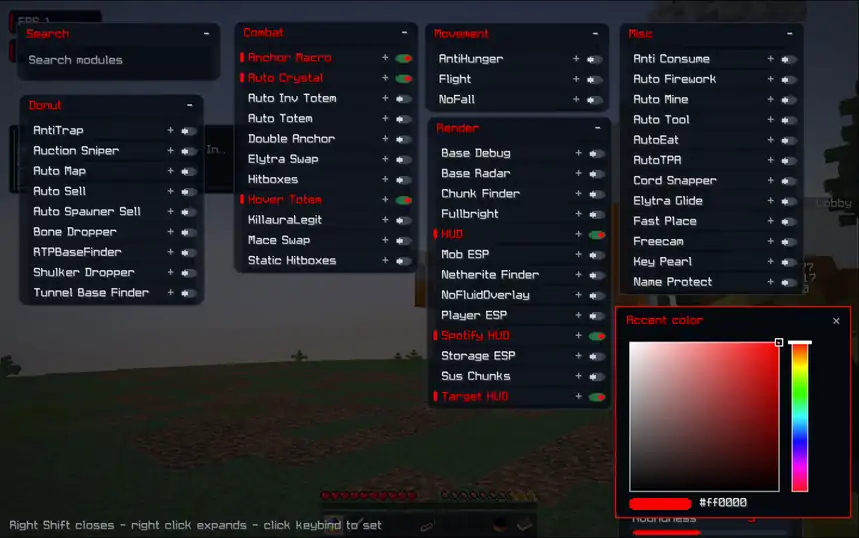
Thin Client is made to feel easy from the first time you open it. No digging through a mess of menus.
The visual tools are easy to read, so you can get the information you need without filling your whole screen.
Move things where you want them, change what you need, and keep the rest out of sight.
Sign in with Discord and manage your license, downloads, and support from the same place.
Less clutter.
More playing.
Your account, all in one place.
Sign in with Discord to check your access, activate a key, download the client, or ask for help.
Your licenses, downloads, profile, and support are all here when you need them.
Use Discord to see your licenses, downloads, profile details, and settings.
Continue with DiscordLoading your account...
Checking your account...
Need help buying, setting things up, or resetting your HWID? Message us in Discord.
It helps if you include your Discord username and license ID.
See customer requests and manage access without jumping between different pages.
When someone has client sharing turned on, staff can see their IGN, server, and linked Discord account here.
Sign in, make sure your license is active, then download the version you need.
Open your account to check your access and download your build.
Open my accountFor buying, activating, or account help, come talk to us in the Thin Client Discord.
Join DiscordHit the Discord sign-in button. Once you are in, you will see your licenses, downloads, profile details, and account settings.
Sign in and open your account. If your license is active, you can choose your platform and download the latest build there.
You can request an HWID reset from your profile. For anything else, message us in Discord and include your Discord username and license ID.
We use Discord to sign you in and keep your account linked to your license. Your license, download, and support details are only used to give you access, prevent abuse, and help when something goes wrong.